

Product updates
Event Packages - our biggest upgrade yet
🚀 Event planning should be exciting - not a spreadsheet marathon Our venues told us that juggling packages, payments, and pricing was slowing them down.
Read the articleProduct updates · 1 min read
We've just released a new update that seamlessly adds supplements to specific food and drink items within menus, for more flexible pricing and

We’ve just released a new update that seamlessly adds supplements to specific food and drink items within menus, for more flexible pricing and transparency.
This update will help venues charge extra for premium ingredients or specialty upgrades and reflect the additional costs clearly.
The supplement system is straightforward and can be set up directly from the venue side:
Go to your Venue section
Navigate to Food & Drink
Click the three dots next to an item and select Edit
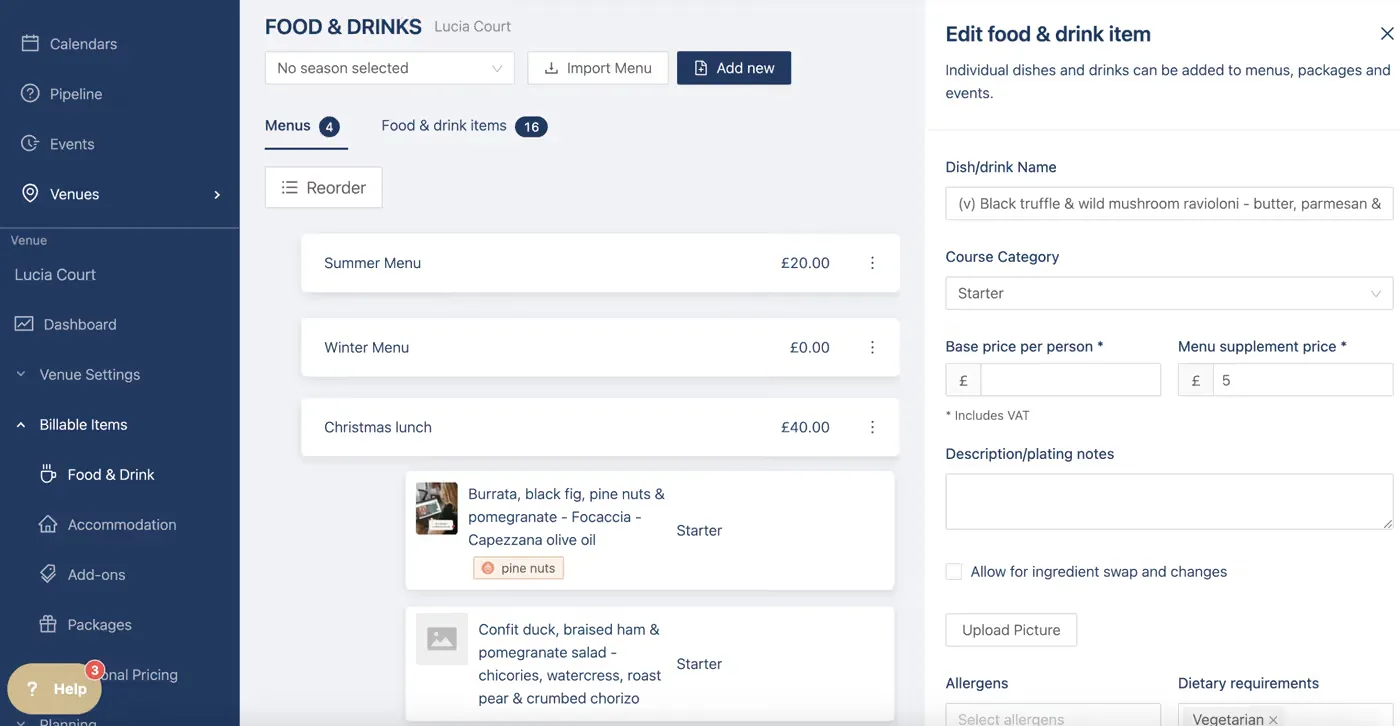
From there, you’ll find a new field titled “Menu Supplement Price”. Simply add the additional amount you want to charge for that specific item. For example, if a dish includes luxury ingredients like truffle, you could add a supplement of £5 to cover the added cost.
After saving, the supplement will now appear within the menu, making it easier to track which items have added charges.
Venue admins can also edit menu items and quantities as needed, and the system will automatically factor in both the menu price and the supplement when calculating the event’s overall budget.
This new feature is a significant step forward in giving venues greater pricing control and improving budget transparency during event planning.
Whether you’re offering seasonal upgrades, premium wine pairings, or ingredient substitutions, supplements let you reflect real-time costs without having to rebuild an entire menu.
Product updates
🚀 Event planning should be exciting - not a spreadsheet marathon Our venues told us that juggling packages, payments, and pricing was slowing them down.
Read the articleProduct updates
Calling all Venues - we've got more exciting new features to tell you about... Accommodation Glow up For all our venues with accommodation, there's two new
Read the articleProduct updates
Our new Event Wizard moves you smoothly from the first enquiry to the final invoice - gathering all the details ready to personalise in seconds. The wizard
Read the articleOne email a month for wedding and event venue teams. Real ideas from real venues, industry updates, and the odd product release worth telling you about. No spam, unsubscribe any time.
Thanks. You are on the list.